
Your iFIT Machine Just Got an Upgrade: New Features You'll Notice Right Away
Release Date: Jul 9, 2026
Your iFIT experience just got a meaningful update.
The latest software is now fully live on iFIT 2.0-compatible machines. Four updates, all targeting the moments where training used to slow you down.
From saving a workout you had to cut short, to finding what you want faster, to filters that are actually built around you, this update is about fewer friction points and more time moving.
Here's what's new.
Finally: Pick Up Where You Left Off
Something came up. The workout stopped. Until now, that meant starting over next time.
Not anymore.
You can now end a workout early, save your progress, and resume exactly where you stopped in a future session. When you tap End Workout, your machine will ask: "Do you want to finish this workout another time?" Tap Yes to save it, or No to close it for good.
Your saved workout shows up on the Dashboard with a progress bar showing how far along you are. It stays there for up to one week.
When you come back, open the workout card and choose from three options: Resume, Restart, or Mark Complete.
Worth knowing: each partial session logs its own activity and counts toward your milestone totals. Stopping at minute 18 of a 30-minute run still counts for minute 18.
This works for video-guided and map workouts across all equipment types and is available to all membership tiers.
.png)
Finally, a Search That Keeps Up
Finding the right session on a touchscreen console has always required more effort than it should. This update makes it noticeably faster in two ways.
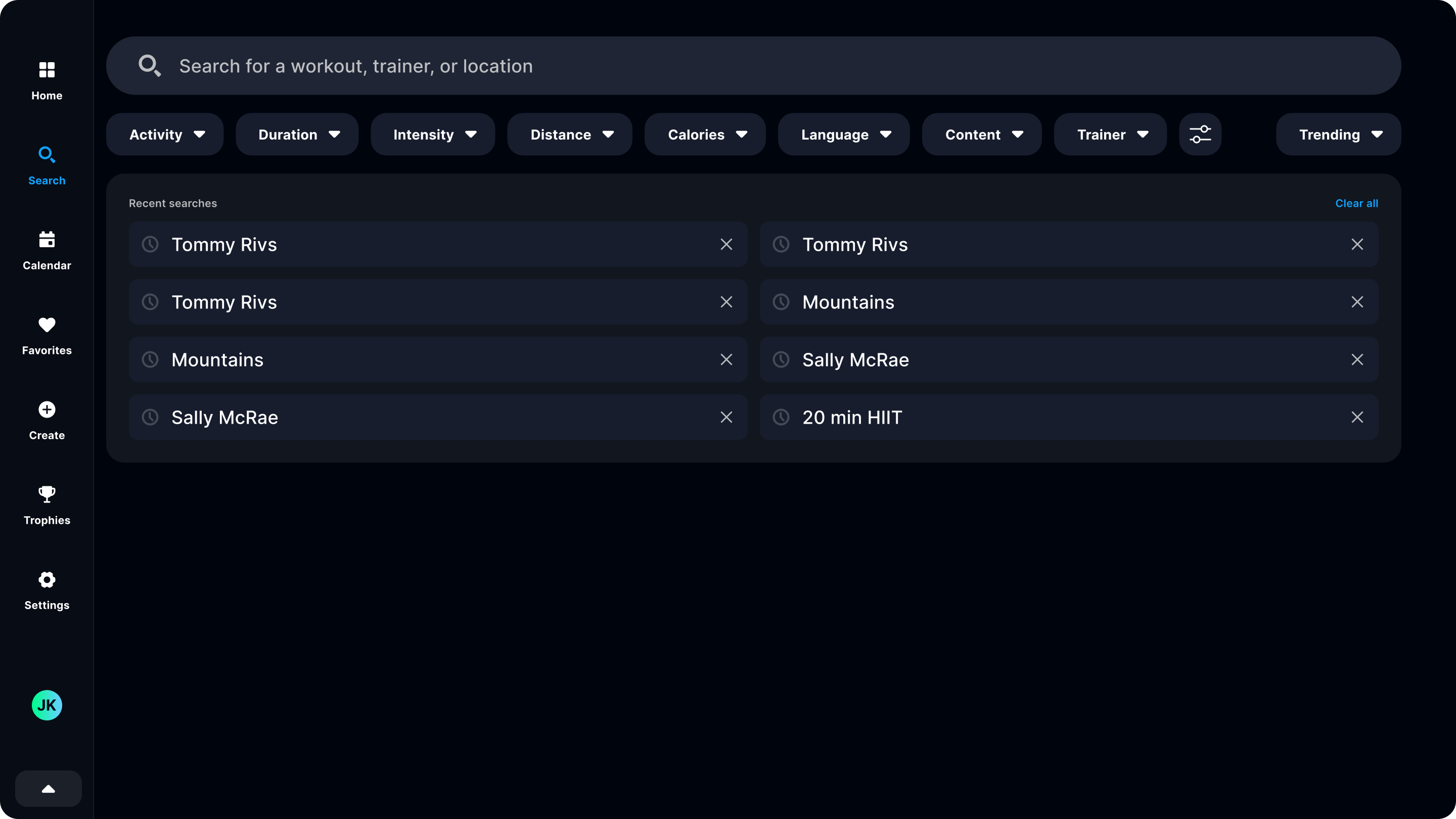
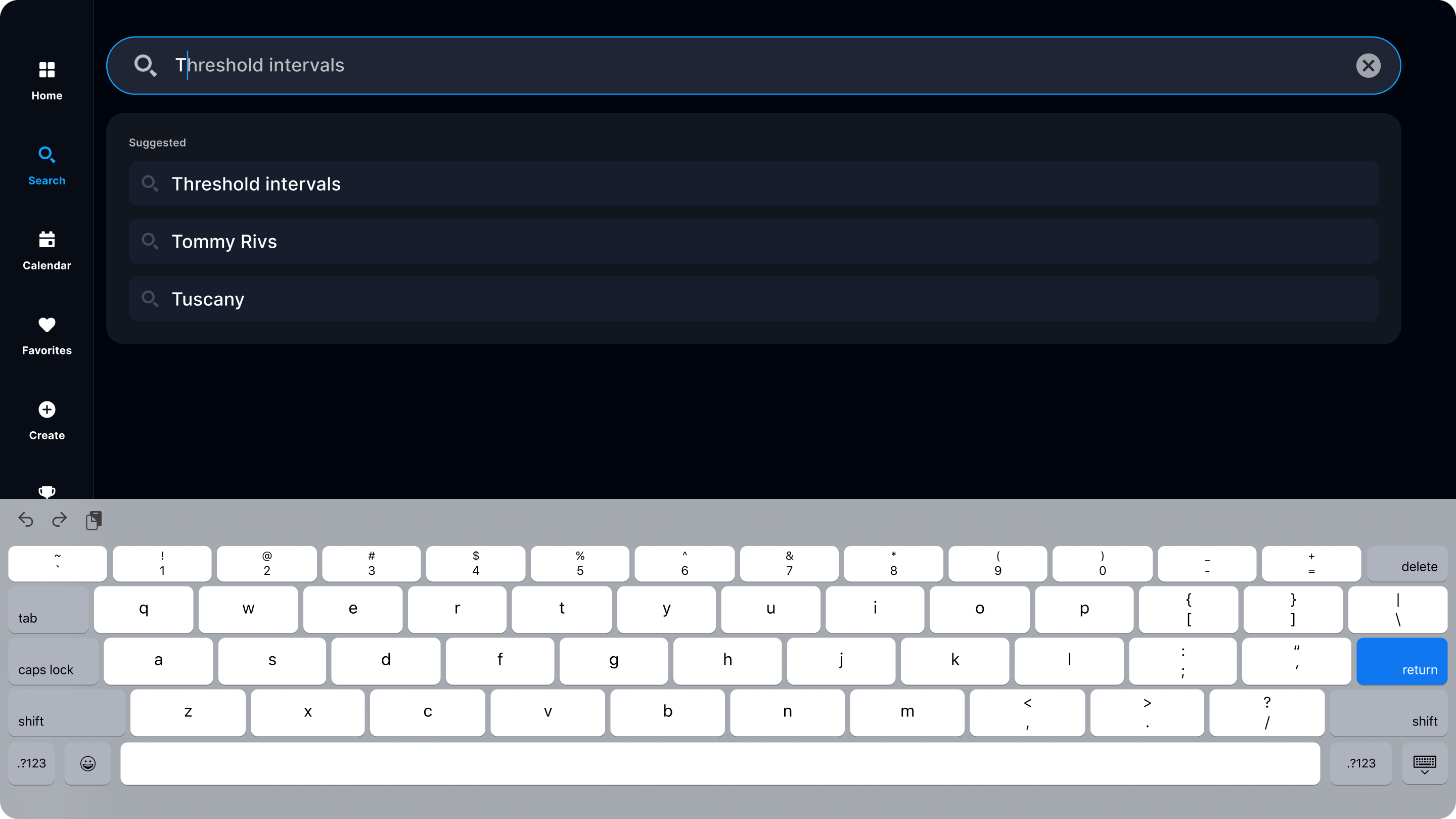
First, predictive search. The moment you start typing, a live dropdown appears with up to five suggestions: workout titles, trainer names, series, and locations. It updates with every keystroke. Type "Ash" and Ashley Paulson's series are already populating. It works in your console's set language and is available on every membership tier.
Second, recent searches. Open the search bar and your recent history auto-populates. No typing required. If you come back to the same trainer or the same series regularly, you're one tap away.
Together, these cut down the time between wanting a workout and starting one. If you've ever stood in front of a machine scrolling too long, you know it's the moment most people just leave.
Filters That Reflect How You Actually Train
The workout filters have been updated, and the difference is in the details.
On the calorie side, you can now filter by estimated burn: less than 100, 100–300, 300–500, 500–700, and 700+. Those estimates are based on your personal profile (weight, age, and gender), not a generic average. The number you see in search results matches what you'll see on the pre-workout screen.
On the distance side, the filters now use the milestones people actually train for: 5K, 10K, and half marathon, with separate options by equipment type. A smart buffer means a 3.2-mile run still shows up in a 5K search, and workouts with milestone names in their titles are pulled in automatically.
Warmup and Cooldown Are Back for Manual Workouts
Warmup and cooldown screens are now available for manual workouts, bringing them in line with the trainer-led experience that has always included them. The warmup runs 3 minutes, the cooldown runs 10, and both are tracked separately so they don't skew your main workout stats.
A new "Go to cooldown" button is also available from the pause screen at any point during a manual session. That button is now available on video workouts too.
.png)
What These Updates Mean for Your Training
These four changes are all solving the same thing: the small moments that used to get in the way.
Saved workouts remove the penalty for stopping early
Smarter search removes the friction of finding what you want
Personalized filters remove the guesswork about which workout fits today
Warmup and cooldown for manual sessions close the gap between trainer-led and self-directed training
And when fewer things get in the way, it's easier to keep showing up.
Live Now
The update is fully rolled out to all iFIT 2.0 members as of July 9.
If you're not seeing it yet, make sure your machine is running the latest software version.
The primary purpose of this blog post is to inform and entertain. Nothing on the post constitutes or is intended to be a substitute for professional medical advice, prevention, diagnosis, or treatment. Reliance on any information provided on the blog is solely at your own risk. Always seek the advice of your physician or other qualified health provider with any questions you may have regarding a medical condition, and please consult your doctor or other health care provider before making any changes to your diet, sleep methods, daily activity, or fitness routine. Do not disregard professional medical advice or delay seeking it because of information available on this blog. iFIT assumes no responsibility for any personal injury or damage sustained by any recommendations, opinions, or advice given in this article. Always follow the safety precautions included in the owner's manual of your fitness equipment.
You might also like

The iFIT App Just Got Smarter: What’s New in August 2026
iFIT's August 2026 update brings Stacked Workouts, a smarter SmartAdjust, and customizable metrics. Here's what changed and what it means for your training.
August 17, 2026
Your iFIT Machine Just Got an Upgrade: New Features You'll Notice Right Away
The latest iFIT software update is live. Resume saved workouts, search smarter, filter by calories and distance, and get warmup and cooldown for manual sessions.
July 13, 2026
Take Control of Your Workout: New iFIT Updates You’ll Notice Right Away
Take control of your workouts with the latest iFIT updates, including long-awaited video playback controls, simplified audio settings, and new streaming apps like YouTube TV and iHeartRadio.
March 31, 2026